
Artificial intelligence has become an integral part of IT teams at lightning speed. In just a few years, tools such as GitHub Copilot, Cursor, and automated test wizards have gone from technological curiosities to must-haves in many organizations.
But behind the hype, one question remains: does AI really improve the software delivery workflow, or does it add a new layer of complexity to manage?
The promise of productivity gains of up to 55% for both male and female developers, according to a GitHub Copilot study, is making decision-makers' eyes glaze over. Yet, in discussions with CTOs and business leaders at Nexapp, one observation emerges: while AI certainly enables faster work, maximizing its impact requires an efficient software development life cycle (SDLC).
This is precisely where Value Stream Mapping (VSM) comes into play, an analysis tool that visualizes each stage of the software development cycle to identify areas of "waste" and bottlenecks. In this way, development teams can reduce delivery times and get their ideas to users faster.
In this article, we explore how AI fits into this value stream, its measurable benefits, and how to maximize its impact on your SDLC.
Understanding Value Stream Mapping (VSM) in software development
Value Stream Mapping is a Lean Manufacturing practice adapted to the software industry. Its principle is simple: visualize all the steps required to go from an idea or customer request to a feature delivered in production, by measuring the processing time and waiting time at each step.
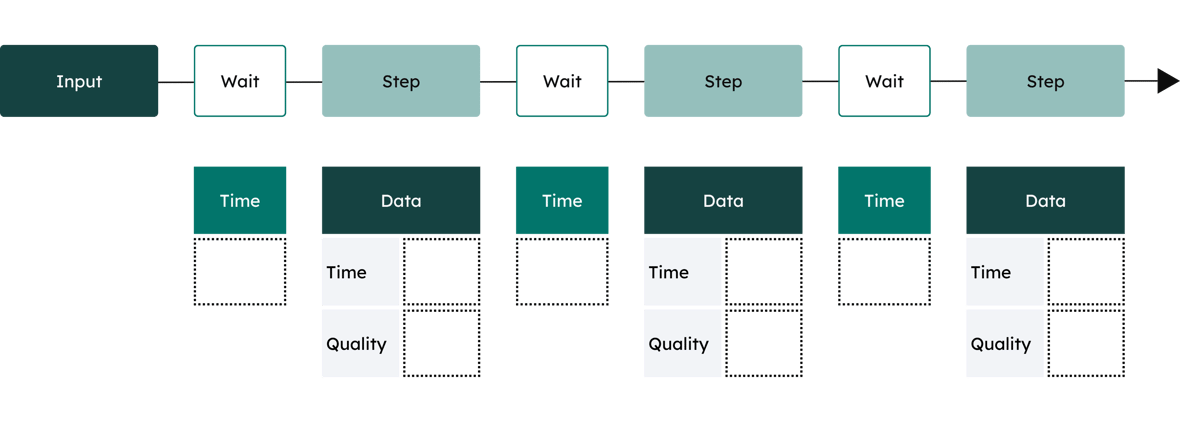
In an Agile or DevOps context, the VSM helps to answer concrete questions such as :
- How much time elapses between writing a user story and putting it into production?
- Where are the bottlenecks slowing down the team?
- How much of the time is actually productive, compared with the time spent waiting?
The most common sources of "waste" in software development include long queues for code reviews, repetitive manual test cycles, handoffs between teams, and back-and-forth due to ill-defined requirements. It's exactly in these areas of friction that AI is beginning to play an increasingly significant role.
In software development, total delivery time (Lead Time) is often divided into two parts:
- Touch Time
This includes all value-added work: programming, design, code review, test writing, etc. - Wait Time
Approvals, manual testing, deployment, fuzzy specifications.
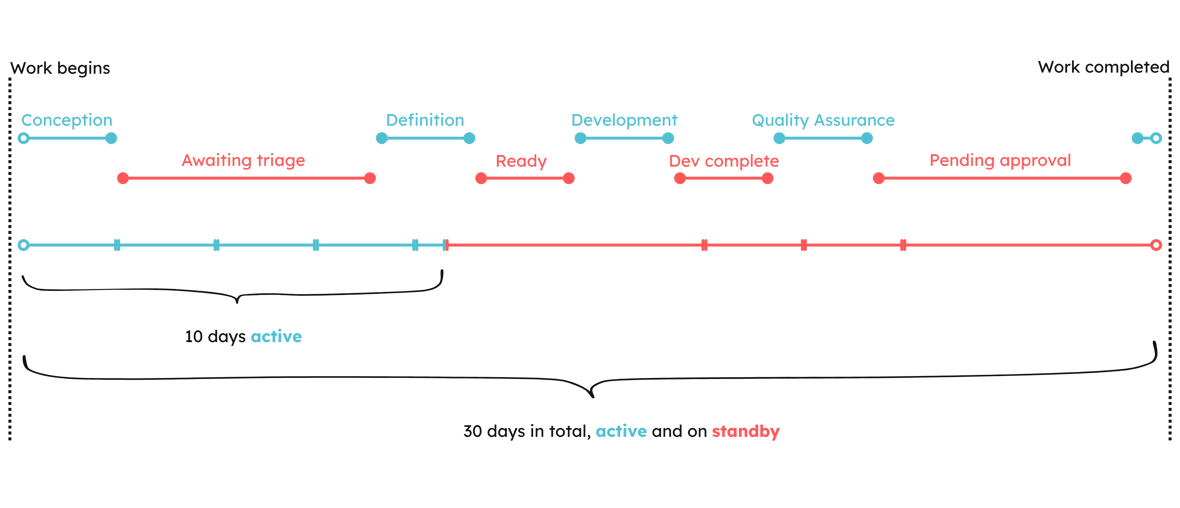
AI mainly tackles the programming phase. Research indicates that this stage accounts for, on average, 10-20% of delivery time. Optimizing this part, therefore, offers marginal gains when viewed as a whole. We'll come back to this point a little later!
How does AI fit into each stage of the development cycle?
One of the most interesting aspects of artificial intelligence in software development is that it's not limited to writing code. It touches virtually every stage of the value stream. In other words, AI has the potential to optimize every stage of the software development cycle.
Planning: define before you build
The planning phase is often underestimated. Yet this is where much of the downstream "waste" occurs. Today, AI-powered tools can help generate user stories from a high-level description, suggest acceptance criteria, detect ambiguities in requirements, and even estimate the complexity of a task based on the team's history. The result: less backtracking, fewer misunderstandings and better-defined backlogs from the outset.
AI-based project management tools can also analyze historical data to provide more accurate estimates of deadlines and costs. This enables project managers to make more informed decisions and better plan resources.
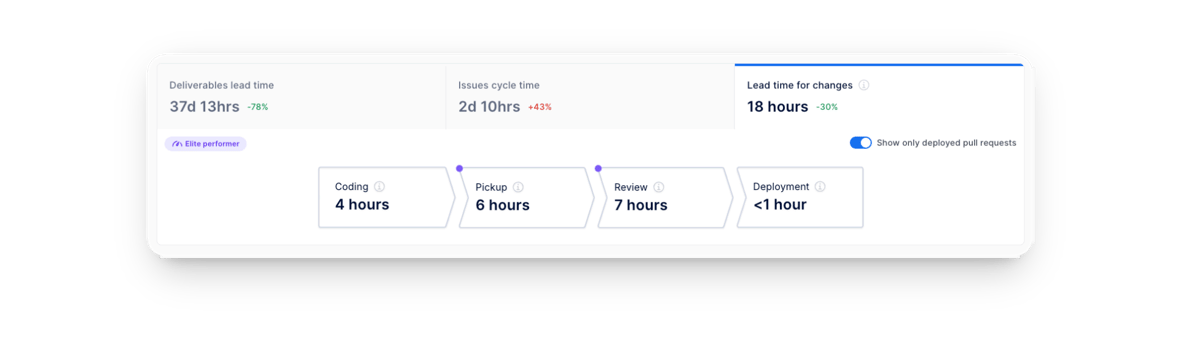
Finally, AI can aid risk management by continuously monitoring project progress and identifying deviations from the original plan. At Nexapp, we have created the Axify intelligent tool, which provides a real-time view of the delivery performance of software delivery teams.
Development: day-to-day code assistance
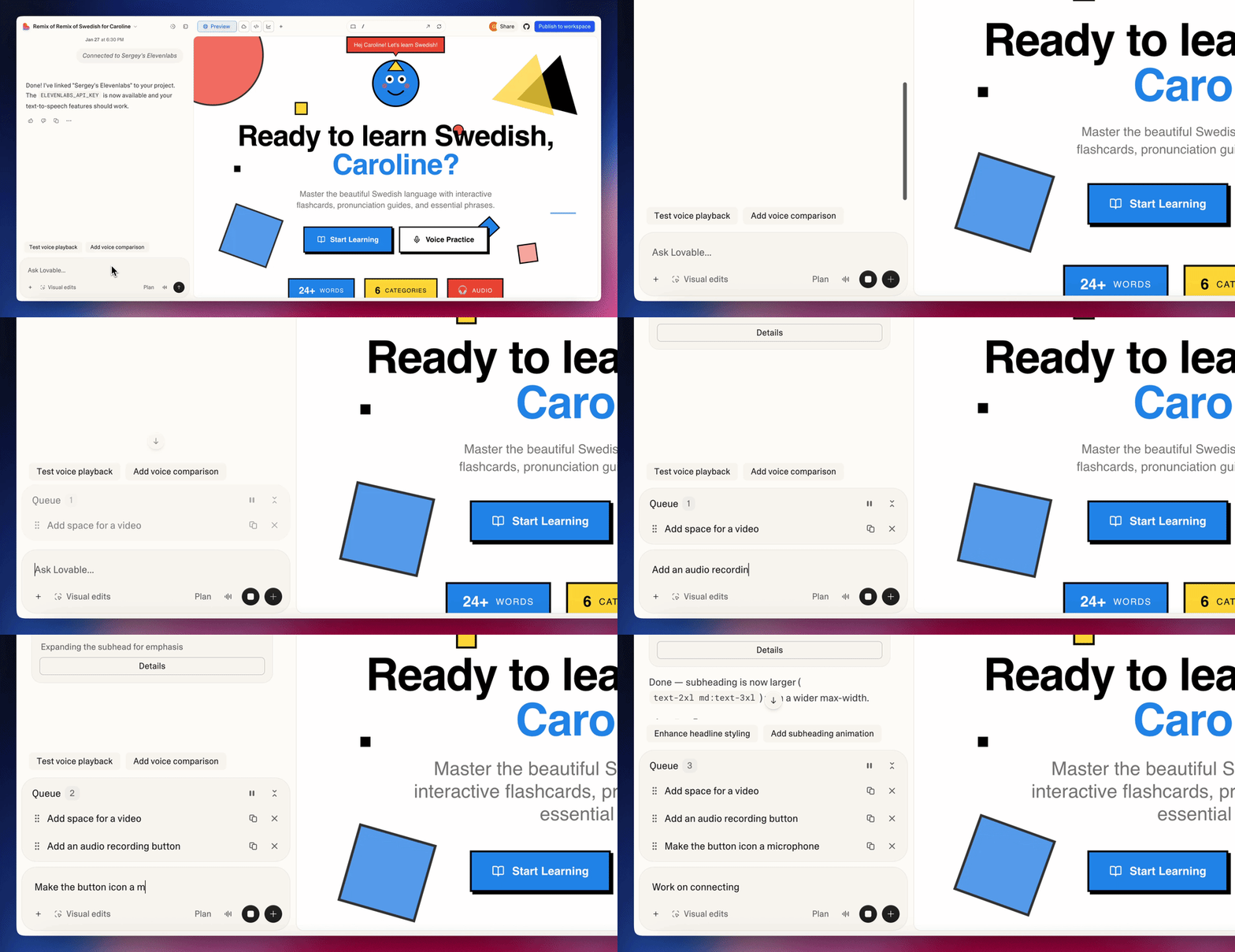
This is probably the most visible use of AI at the moment. AI programming assistants such as Claude Code, GitHub Copilot, Cursor, or Amazon CodeWhisperer enable development teams to generate code, receive contextual suggestions, and speed up the writing of repetitive functions.
Beyond simple code completion, these tools also automatically document code, suggest refactorings and identify potential problems in real time. For teams that measure their velocity, the gains can be substantial. The most recent State of AI-Assisted Software Development report from the DORA Group indicates an increase in productivity of up to 40% for specific development tasks.
AI is also transforming the design phase. It enables abstract concepts to be transformed into functional prototypes with greater speed and precision. What once took dozens of mock-ups can now be visualized and tested in a matter of hours, enabling teams to validate business hypotheses much earlier in the cycle.
Testing: from automatic generation to intelligent detection
Testing is often one of the biggest bottlenecks in a software VSM. AI can automatically generate test cases from code or specifications, detect regressions more intelligently by prioritizing tests according to risk, and suggest test scenarios that humans might have missed.
This significantly reduces the time spent on manual testing while improving coverage, two objectives that were often seen as contradictory before the advent of these tools. This ensures that the most critical parts of the software are exhaustively tested, increasing the reliability and robustness of the final product. In this way, AI improves code quality without increasing the workload of the quality assurance (QA) team.
Code review: speeding up without sacrificing quality
Code reviews are essential to software quality, but they can create significant queues in the flow. AI-powered code analysis tools can perform automated initial analysis to detect style issues, security vulnerabilities, and bad practices, freeing up human reviewers to focus on more complex architectural and functional issues.
Deployment and monitoring: from reactivity to proactivity
AI-based automated deployment systems can test and validate updates before deployment, ensuring they do not introduce new bugs or compatibility issues. What's more, AI can optimize deployment by selecting the most opportune times to apply updates while minimizing impact on users. These advanced maintenance capabilities keep software up to date and secure while reducing disruption to end users.
In production, AI enables a shift from a reactive to a proactive posture. Intelligent observability tools can detect behavioural anomalies before they cause failures, identify the likely cause of an incident, and even trigger automated corrective actions in certain cases. AI can scan code bases in real time to identify vulnerabilities (Snyk, GitHub Advanced Security) that the human eye might miss, integrating security directly into the development flow rather than waiting until the end.
The impact of AI on developer productivity: watch out for new bottlenecks
When applying the VSM before and after the introduction of AI, certain indicators show concrete, measurable improvements within mature development teams.
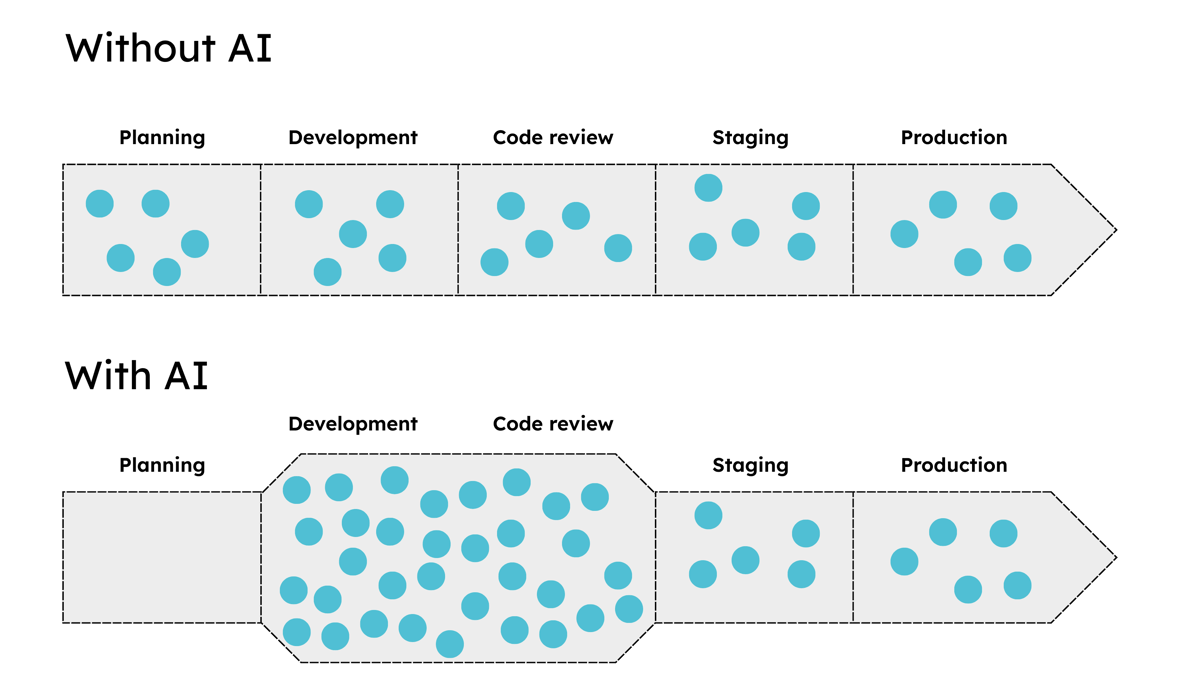
However, without a mature DevOps culture and robust continuous integration and continuous delivery (CI/CD), AI will only shift the bottleneck further down your value chain. If you code 2x faster, you create 2x more code to review, 2x more tests to run and 2x more features to deploy. Here are four potential bottlenecks to watch out for when integrating AI into your software development practices.
1. The bottleneck of context switching and cognitive overload
AI produces code at a speed that exceeds the human capacity to assimilate it. Development teams find themselves managing a massive amount of code they haven't mentally written. The result: an increase in context switching to understand what the AI has generated, paradoxically slowing technical decision-making.
2. The bottleneck of safety and compliance validation
Producing 2x more code means 2x more dependencies to scan and security risks (library hallucinations, vulnerabilities). Are your senior staff ready to validate 2x as many PRs without becoming the main drag? Because without rigorous human supervision, AI can accelerate the creation of invisible technical debt. What's more, if your security or compliance team intervenes manually at the end of the cycle, it becomes the ultimate brake, cancelling out all the speed gains made upstream.
3. The bottleneck of quality assurance (QA) and integration testing
Even if AI helps write tests, the complexity of integration increases with the number of features. The bottleneck shifts to test environments: can the team handle a higher deployment load? Integration tests (often longer than unit tests) become the new glass ceiling.
4. The discovery and definition bottleneck
This is the "upstream" bottleneck. If engineering codes 50% faster, but product managers can't define requirements or validate features at the same rate, you'll end up with a technical team pedalling in the dark or building useless features faster. Your ability to define value must now keep pace with your coding speed.
Case study: why AI changed (almost) nothing for this customer
Recently, one of our customers wanted to massively integrate AI into their development practices to move faster. When we analyzed the mapping of their value stream with Axify, we discovered that pure development took just 3 days. AI could have reduced this step to 4 hours. Impressive? Not really, considering that the post-development validation and deployment process took 6 weeks.
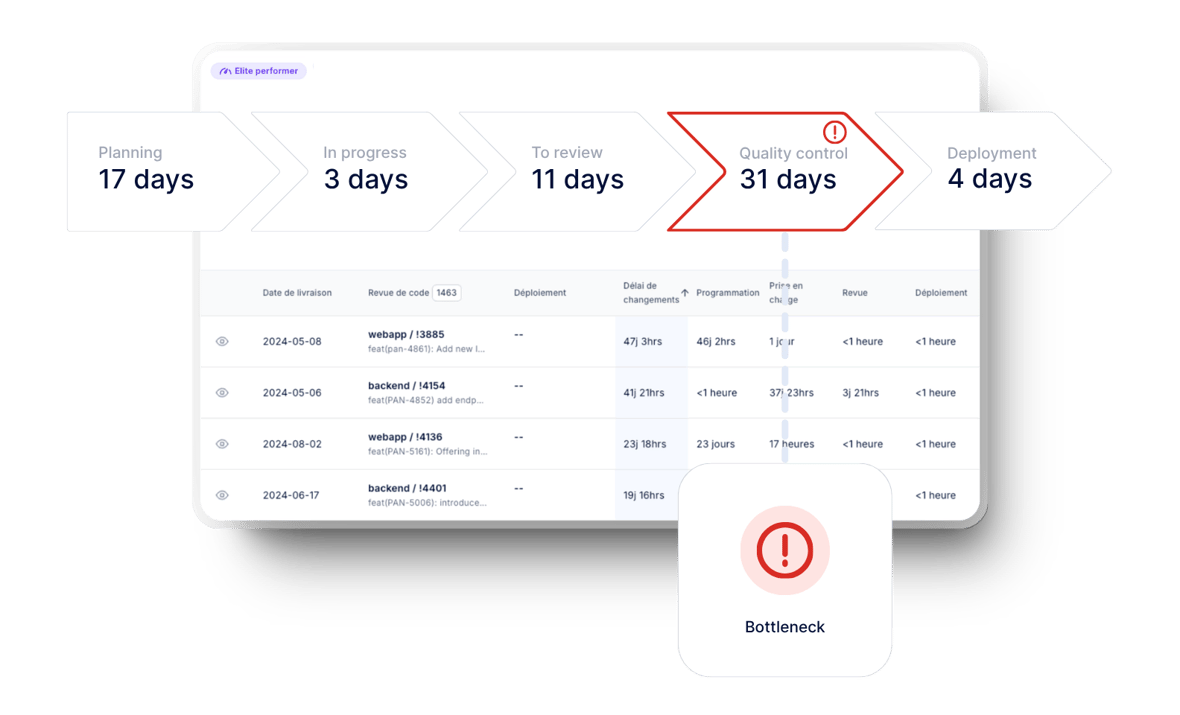
This has enabled them to adjust their practices to optimize their entire delivery cycle and take advantage of all the gains of AI programming agents.
Measuring the invisible: how Axify measures the impact of AI on developer productivity
The classic mistake is to measure AI performance by the volume of code produced, but more code doesn't mean more value. For a technical leader, the question is not "Are my development teams coding faster?", but rather "Are my features getting to market faster with higher quality?"
This is where the use of a Software Engineering Intelligence platform, like Axify, becomes strategic.
Axify lets you measure the real impact of artificial intelligence on your delivery cycle. With a precise visualization of the correlation between AI adoption and your cycle times, you can compare performance with and without assistance to validate whether your teams are really delivering faster.
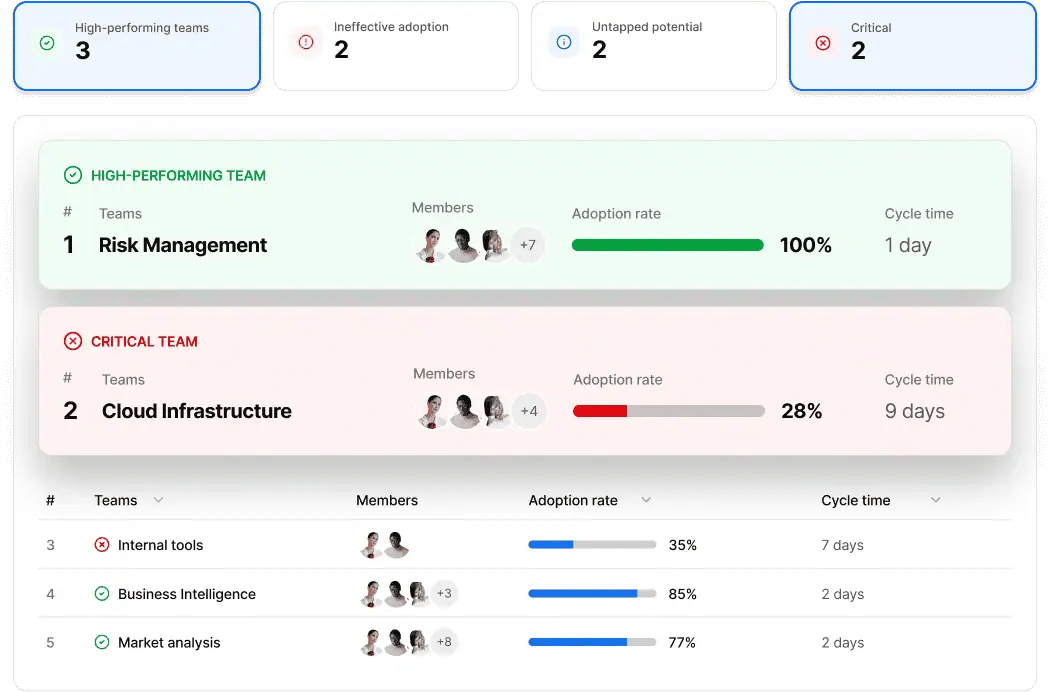
Axify's AI also analyzes every step of your software delivery process to identify bottlenecks, explain their causes and help you determine the changes that will really speed up your deliveries.
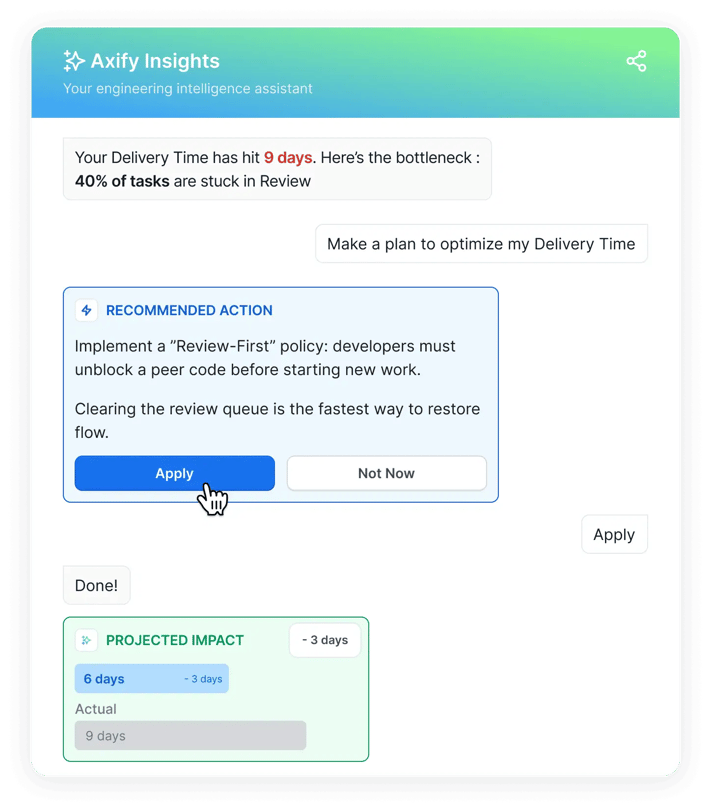
It's the essential ally for confidently demonstrating the ROI of your AI investments to management, while ensuring optimal fluidity of your value stream.
Limits and risks not to be ignored
Promising as it is, the use of artificial intelligence in software development is not without risks.
The technical debt generated by AI-based programming assistants is probably the most insidious risk. Automatically generated code can work well in the short term yet be difficult to maintain, less than optimal or inconsistent with team standards. Without rigorous human review, technical debt can accumulate faster than problems can be solved.
Dependence on tools also creates organizational fragility. If a team becomes unable to function effectively without its AI assistants, it becomes vulnerable to pricing changes, service interruptions or tool evolutions. For a CTO, the main risk is the loss of contextual knowledge: if a developer lets the AI write all the code without understanding it, who will be able to intervene during a major production incident?
Resistance to change should not be underestimated. Introducing AI into the workflow alters habits and can cause anxiety within teams, particularly as regards job security. Serious change management is essential.
Security and confidentiality are also legitimate concerns, especially for organizations handling sensitive data. It is essential to understand how AI tools process and store submitted code.
Finally, AI is no substitute for systems thinking. It can optimize individual steps, but it won't detect on its own that the real problem is organizational rather than technical.
Practical tips for starting your transition to AI
If you want to introduce AI into your software value stream effectively, here's the approach we recommend:
1. First, map your current VSM. Before introducing any tools, take the time to document your value stream as it is today. Identify your main waiting times and bottlenecks. Without this foundation, it will be impossible to measure the real impact of AI.
2. Identify the most wasteful areas. Target efforts where the potential for improvement is highest. If your biggest problem is requirements quality, start with planning-oriented AI tools. If it's test speed, invest in intelligent test automation.
3. Introduce AI in a targeted way, not across the board. The temptation is to transform everything at once. Resist it. Choose one or two tools, experiment with a pilot project, measure the results and adjust before expanding.
4. Define your success metrics in advance. Use a metric, such as delivery time, as a starting point. Measure before and after with platforms like Axify to get an objective picture of the impact and check whether AI is really improving your overall velocity.
5. Invest in training and support. AI is a tool, and like any tool, its effectiveness depends on how it's used. Train your teams not only on how the tools work, but also on their limitations and risks.
Conclusion: AI is a powerful gas pedal ... provided you optimize your SDLC
AI has already begun to significantly transform the software value stream, optimizing every stage of the software lifecycle. From design to maintenance, testing and project management, AI offers solutions to improve software efficiency, quality and security. This transformation is still in progress, and future advances in AI promise to make these processes even smarter and more automated.
AI represents a real opportunity to improve the value stream, reduce delivery times and eliminate some of the "waste" that has been holding teams back for years.
The organizations that will benefit most are those that approach it with rigour: by first understanding their current value stream, targeting the right issues and objectively measuring the impact.
AI is a gas pedal, but it's your team, your processes and your culture that determine the direction of your acceleration.
Would you like to map your software value stream or explore how AI might fit into your specific context? Contact us to discuss.
FAQ
What AI tools are used in software development?
The most common include GitHub Copilot, JetBrains AI, and LLMs such as Claude 3.5, Sonnet, or GPT-4o. In Canada, adopting secure solutions that comply with data protection standards is a growing priority.
What are the benefits of AI in the software development cycle?
Reduce repetitive tasks, detect bugs early, learn new libraries faster and improve test coverage.
How can AI be integrated into an application development project?
Start with a discovery phase to identify high-value-added tasks that can be automated, then integrate assistance tools directly into development teams' IDEs.
How can we measure the impact of integrating AI into a software development project?
To measure the impact of AI on developer productivity, you need to track your delivery time and quality metrics, such as the change failure rate, to validate that programming speed translates into faster time-to-market. A platform like Axify enables you to correlate AI adoption with your performance metrics.
How can AI improve code quality?
AI improves quality by automating early vulnerability detection and generating rigorous unit tests that cover critical paths. It acts as a permanent second set of eyes, ensuring compliance with programming standards and facilitating refactoring towards cleaner, more maintainable code.
What advantages does AI offer for software test automation?
AI is revolutionizing test automation by instantly generating complete test suites and offering self-healing scripts that adapt to code changes, guaranteeing maximum coverage while freeing teams from repetitive manual maintenance.
Will AI replace developers?
No. It transforms their role. Developers become critical architects and reviewers. Human expertise remains indispensable for understanding complex business needs and system architecture.
Get the most out of AI coding
Nexapp works with you to deploy AI in your engineering practices, making it a real driver of performance within your development teams.

Continue reading