

“Three days before release, our integration tests froze—Blocked by an expired SSL cert. We lost 14 person-hours unravelling a problem everyone saw but no one owned.”
Sound familiar? Situations like this are common in software teams, where a blocked work item is visible to everyone yet owned by no one. It can quickly derail progress and negatively impact team productivity. Addressing them proactively and transparently can help maintain a healthy workflow. Here’s a structured approach to effectively deal with blocked items.
1. Visualize Blockersin Your Software Development Life Cycle
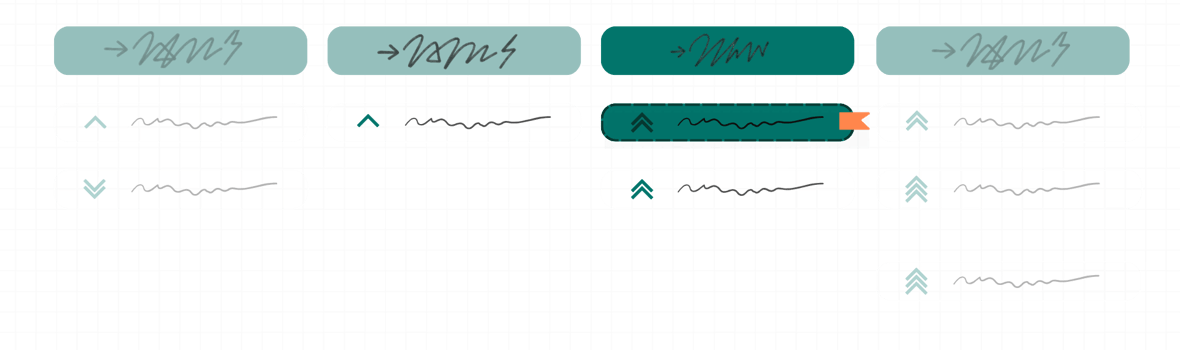
Blocked work items should never be hidden or overlooked. To ensure they receive the immediate attention they deserve, implement clear visualization strategies.
-
Make them Pop: Use bright colours or clear visual indicators to highlight blocked items. For example, in a digital project management tool, apply a red tag or a "blocked" status label to the card. If using physical cards, use brightly colored stickers or markers. This ensures blocked items stand out at a glance.
-
Avoid Using a Separate Column (Generally): While some teams use a "Blocked" column, it can often lead to items being forgotten or ignored. Instead, integrate blocked items within your existing workflow columns. This keeps them in the flow and ensures they remain visible in the active work. For instance, a task might be in the "In Progress" column but marked with a red flag to indicate it's blocked.
-
Front and Center: Ensure blocked items are the first things you notice when you open your project board. Consider sorting or filtering your board to prioritize blocked items. If using a physical board, place blocked cards at the top of their respective columns or use a visual cue to draw attention to them, such as a larger card or a distinct marker. This practice ensures they are addressed during daily stand-ups and planning sessions.
2. Tackle Blocked Work Items Fast
Allowing blocked items to linger increases project risk. Actively managing them means:
Immediate Attention
Never allow blocked tasks to stagnate in the backlog or at any stage of the workflow. As soon as a block is identified, it should be acknowledged, and a resolution plan should begin. For example, if a developer is blocked waiting for a code review, the team lead should be notified immediately, and the code reviewer should be prompted to prioritize the review.
Set clear expectations for response times to reported blocks. For example, aim to acknowledge and start investigating a block within an hour of it being reported. This helps prevent minor issues from turning into major delays.
Daily Discussions
During daily stand-ups, specifically address blocked items and ask, "How can we unblock this?" This should be a standard part of the daily routine. Don't just ask if there are blocks; actively discuss each one.
Encourage team members to share what they've already tried to resolve the block. This can spark ideas and prevent duplicated effort. For example, someone might say, "I tried contacting the external vendor, but haven't heard back. Has anyone else worked with them before?"
Document the action items and owners in one agreed-upon spot—ideally the blocker’s card itself (comment or custom “Next-step” field) or a shared “Blocker Log” page linked from the board. Make updating that record part of the stand-up ritual so everyone knows where to look and nothing slips through the cracks.
Nominate a rotating “scribe” each sprint to verify the log is up-to-date after stand-up and to chase stale entries. Pin the log’s link at the top of your Slack channel and on the board sidebar for zero-click access.
Collective ownership beats “assign a head”
It’s tempting to slap someone’s avatar on a blocked card and call it done, but that often backfires. Team-mates look at the board and think, “Ah, Alexandre is on it,” then mentally move on. The blocker lingers, engagement drops, and the root problem stays hidden.
Instead, treat impediments as everyone’s responsibility and build lightweight habits that keep ownership collective:
-
Rotating blocker marshal (weekly). Each Monday, pick one person whose sole mission is to shepherd every open blocker until it moves again, then pass the baton.
-
Morning unblock hour (daily). Reserve 60 minutes early each day for anyone to swarm a blocker—pull in a reviewer, ping a vendor, reboot an environment—whatever removes friction.
-
Shared definition of “owning a blocker.” During onboarding, clarify that ownership means chasing the issue, updating status publicly, and asking for help early, not silently suffering.
These rituals reinforce collective accountability and stop blockers from rotting in the backlog.
Leverage Work in Progress (WIP) Limits
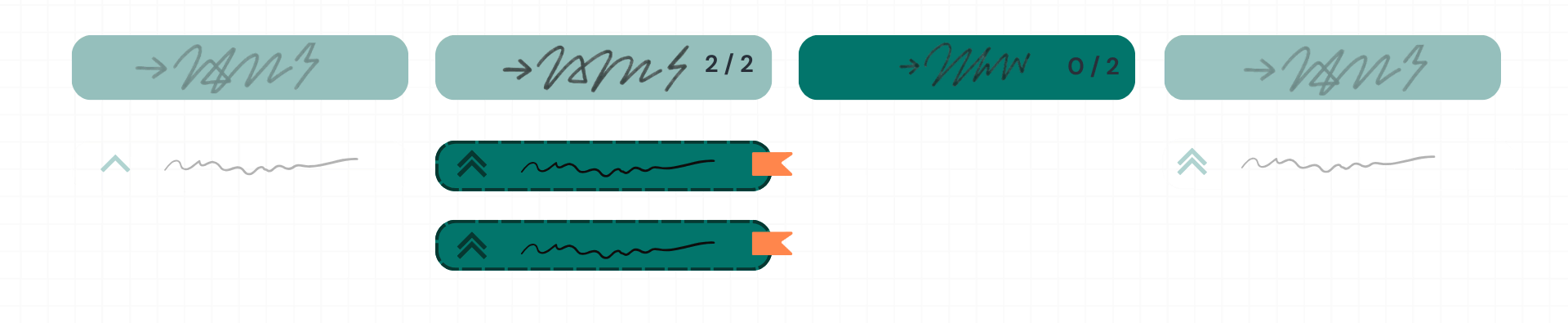
Use work-in-progress (WIP) limits to encourage the team to resolve blocks swiftly, keeping the workflow smooth. If a team hits its WIP limit because of blocked items, new work should not be started until those blocks are resolved.
WIP limits create a sense of urgency to unblock items. For instance, if a team's WIP limit for "In Progress" is five items and three are blocked, only two items can be actively worked on. This forces the team to prioritize unblocking the three items before starting anything new.
Regularly review and adjust WIP limits based on the team's capacity and the nature of the work. If a team consistently has many blocked items, it might indicate that WIP limits are too high or that underlying issues need to be addressed.
3. Learn From Every Block
Blocked tasks are not just roadblocks; they're learning opportunities. Analyzing them properly can reveal deeper systemic issues. To maximize their learning potential:
Root Cause Analysis
Instead of simply logging that a task is "blocked," delve into why it's blocked. Ask "Why did this happen?" and "What could have prevented this?" For instance, if a task is blocked due to missing requirements, investigate why the requirements weren't clear initially. Was there a communication breakdown? Was the initial planning rushed?
Use techniques like the "5 Whys" to dig deeper into the root cause. For example:
- Why is the task blocked? - Waiting for API access.
- Why is API access delayed? - The request wasn't submitted.
- Why wasn't the request submitted? - The developer didn't know they needed it.
- Why didn't the developer know? - The onboarding process didn't cover API access.
- Why wasn't it in onboarding? - The process hasn't been updated recently.
Document the findings of the root cause analysis. This helps in preventing similar blocks in the future.
Central Documentation
Don't let the lessons learned from blocked tasks disappear. Capture insights about blockers in a central location. This could be:
-
Project boards: Add notes or comments to the blocked task cards detailing the cause and resolution.
-
Knowledge bases: Create articles or pages dedicated to common blockers and their solutions.
-
Internal documentation tools: Use Confluence or Google Docs to maintain a log of blockers, their root causes, and preventive measures.
Ensure this documentation is easily accessible to the entire team. This promotes transparency and collective learning.
Regularly review the documented blockers. This can be part of retrospective meetings or periodic process reviews. Look for patterns or recurring issues that require higher-level attention.
Include specific details in your documentation, such as:
-
Context – When it happened (date + time) and what exactly is stuck (story/task ID & title).
-
People – Who spotted the block and who owns the resolution.
-
Insight & Action – Brief block description → root cause → fix applied → prevention step.
4. Communicate out loud
Open communication is critical to swiftly resolving impediments:
Encourage Early Flagging
Empower your team to flag potential blockers immediately once they are identified. This means creating a culture where team members feel safe and encouraged to speak up without fear of blame or judgment. For instance, if a developer encounters an issue that might delay their task, they should immediately report it rather than trying to resolve it on their own for too long.
Provide multiple channels for flagging blockers. This could include raising it during daily standups, using a dedicated Slack channel (e.g., "#project-blocks"), or adding a note directly to the task card in the project management tool. Make it easy and accessible for everyone to report issues.
Train the team on what constitutes a blocker and when to flag it. Some team members might hesitate to report smaller issues, but even minor blocks can accumulate and cause delays. Clearly define what needs to be reported and encourage proactive communication.
Use Central Channels
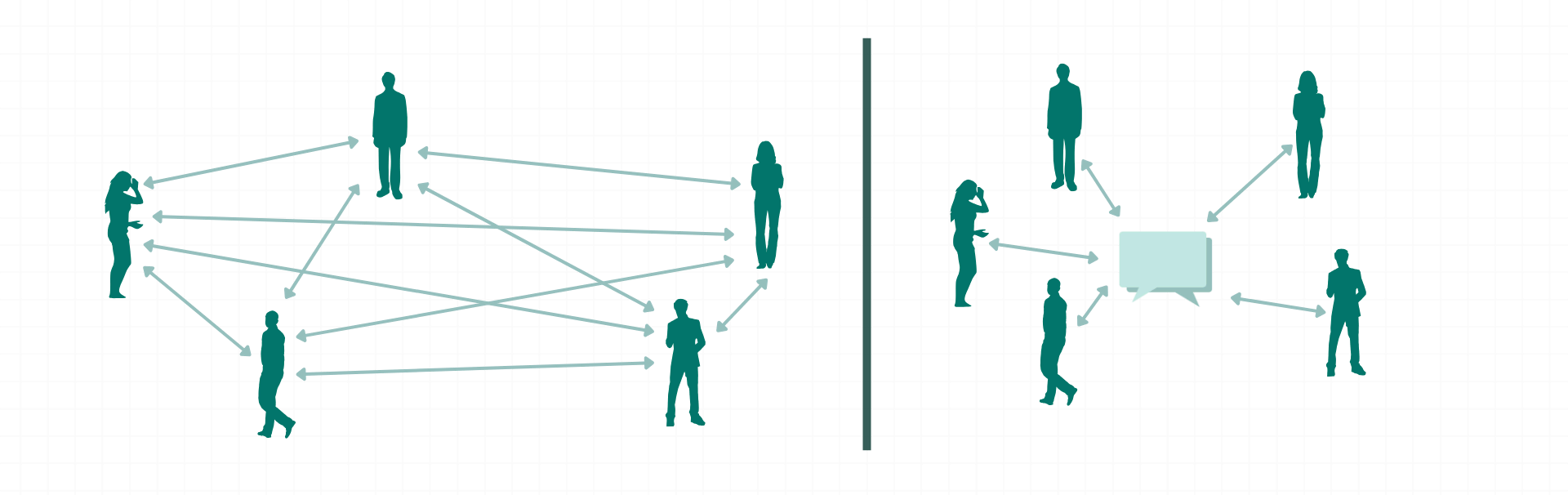
Ensure the team uses public, centralized communication channels, such as Slack or team boards, rather than private messages to promote transparency and collective problem-solving. When issues are discussed publicly, everyone is aware of the situation and can offer assistance or learn from the resolution.
Discourage private messages or side conversations for reporting blockers. If a team member sends a private message about a block, gently remind them to post it in the central channel. This ensures that the information is shared with the entire team and not just one or two individuals.
Document discussions and resolutions in the central channel or linked to the task card. This creates a record of the block, the troubleshooting steps, and the final solution. It also helps new team members or stakeholders understand the history and context of the issue. For example, if a decision is made during a Slack discussion to bypass a specific step, document that decision and the reasoning behind it.
Regularly check the central communication channels for new blockers. Make it a habit to review the Slack channel or team board at least a few times a day to ensure no blocks are being overlooked. This proactive approach helps prevent delays and ensures that issues are addressed promptly.
5. Prioritize and escalate
Treating blockers with priority ensures swift resolutions and maintains momentum. To effectively prioritize blocked items:
Prioritize Like Tasks
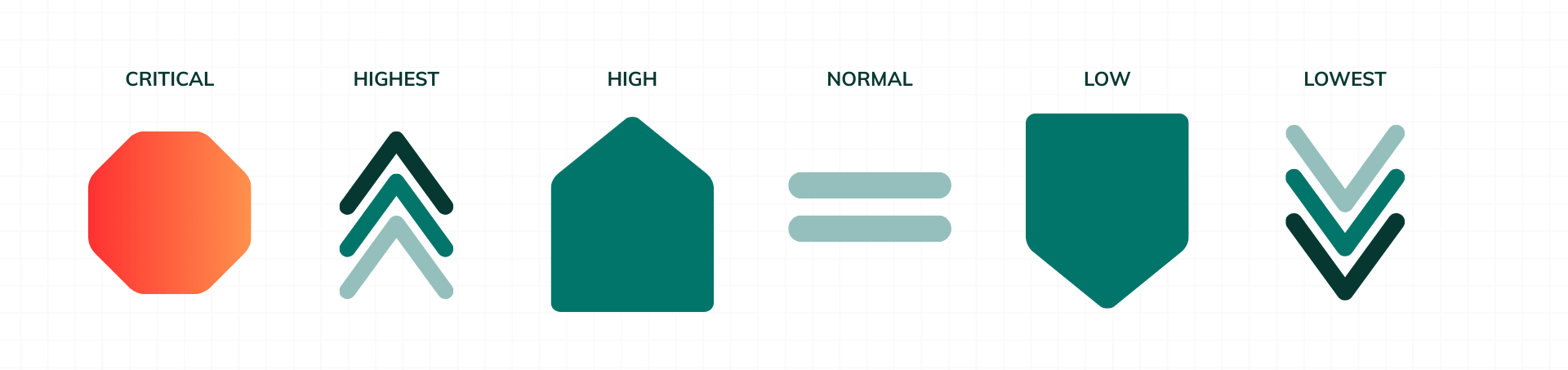
Assign a clear priority to blocked items, as you would to stories or tasks in your backlog. This means using a consistent prioritization system, such as assigning a "high," "medium," or "low" priority, or using a numerical scale (e.g., 1-5).
Consider the block's impact when assigning priority. For instance, a block that prevents multiple team members from progressing should be given higher priority than a block that affects only one person.
Write the rules down—and make them everyone’s job. Keep a short “Blocker Priority Cheat-Sheet” (one slide, Confluence snippet, or board sidebar) that spells out exactly what earns High, Medium, or Low. Because those criteria are explicit and easy to find, any team member—not only the PO—can set or adjust a blocker’s priority the moment they see it.
Ensure that the priority of a blocked item is visible to the entire team. This could be done by adding a priority label or field to the task card in your project management tool.
Regularly review and adjust the priorities of blocked items. As the project progresses, the impact of certain blocks might change, requiring a reprioritization. For example, a "medium" priority block might become a "high" priority if it starts affecting critical deadlines.
During planning sessions, include blocked items in the prioritization discussions. Don't just prioritize new work; also consider the priority of resolving existing blocks.
Escalate Appropriately
Don't hesitate to escalate significant blockers to stakeholders or higher-level management to gain the support or decisions necessary to resolve them. This is especially important when the block involves external dependencies, resource constraints, or policy issues.
Establish clear escalation paths and criteria. Define which types of blocks should be escalated and to whom. For example, budget approval blocks might need to be escalated to the project sponsor, while technical blocks might be escalated to the technical lead.
When escalating a block, provide clear and concise information, including:
- A detailed description of the block.
- The impact of the block on the project.
- What has already been done to try to resolve the block.
- What support or decisions are needed from stakeholders or management.
Follow up after escalating a block to ensure that it is being addressed. If you don't hear back within a reasonable timeframe, follow up again or escalate to a higher level.
Document the escalation process and the outcome. This helps in understanding which types of blocks require escalation and how to escalate them effectively in the future.
For instance, if a critical infrastructure component is unavailable, causing a major development block, escalate this to the IT Operations manager immediately. Provide them with details on how this is impacting the project timeline and what is needed to resolve it.
Proactively visualizing, addressing, analyzing, and prioritizing blocked work items while fostering open communication ensures a smoother development process, less friction, and greater overall team productivity.
Common Pitfalls to Avoid
Avoiding common mistakes is crucial for maintaining a smooth workflow and effectively managing blocked items. Here are some key pitfalls to watch out for and how to prevent them:
Ignoring Blockers

Failing to address blockers promptly can lead to cascading delays throughout the project, increased frustration among team members, and a significant decrease in overall team morale. It's essential to tackle impediments as they arise, not just when they become critical.
Example: If a QA tester reports a major bug blocking further testing and the development team doesn't address it for several days, the entire release cycle will be delayed. This delay can then impact other teams that depend on that release, creating a ripple effect of issues.
Prevention: Implement a system to immediately notify blockers, such as a dedicated Slack channel or an alert in your project management tool. Ensure daily stand-ups include a mandatory review of all reported blockers.
Lack of Visibility
Not clearly marking or highlighting blocked items can result in the team overlooking critical issues, leading to tasks being stalled indefinitely. If blockers aren't easily visible, they might not be addressed during daily meetings or planning sessions.
Example: If a task is blocked due to a missing API key but isn't clearly marked as blocked on the project board, the developer might continue working on it, wasting time and effort. Other team members might also be unaware of the issue and unable to offer assistance.
Prevention: Use consistent visual cues to mark blocked items, such as red tags, "blocked" status labels, or physical markers on cards. Ensure these cues are visible on all project boards and digital tools. Consider using filters to quickly view only blocked items.
Overcommitting
Taking on new tasks while existing ones are blocked can overwhelm the team, spread resources too thin, and reduce overall productivity. This often leads to context switching, which is inefficient and error-prone. Adhere to WIP limits and focus on resolving current blockers first.
Example: A developer has three blocked tasks awaiting external dependencies, but still pulls in two new tasks. This prevents the developer from making effective progress on any task, as they constantly switch between tasks and wait for dependencies to resolve.
Prevention: Enforce Work in Progress (WIP) limits strictly. If a team member hits their WIP limit due to blocked items, they should focus on resolving those blocks before starting new work. Regularly review and adjust WIP limits as needed.
Inadequate Documentation
Not recording details about blockers, including their root causes, resolutions, and preventative measures, can hinder the identification of recurring issues and the development of preventive strategies. This leads to repeating the same mistakes and losing valuable learning opportunities.
Example: A team repeatedly encounters API access delays, but they are never documented. As a result, the onboarding process for new developers is never updated to include API access requests, and the issue persists.
Prevention: Maintain comprehensive records of all blockers. This can include adding notes to task cards, creating knowledge base articles, or using internal documentation tools. Include details such as the date, time, task, person who identified the block, description, root cause analysis, resolution steps, and action items to prevent future occurrences.
Using a Dedicated “Blocked” Column
Using a dedicated "Blocked" column can be contentious. While some teams find it helpful for visualizing impediments, others consider it a bad practice because it can:
-
Interrupt Workflow: It might encourage teams to leave issues "stuck" in a separate column rather than promptly resolving the blocker. Tasks can languish in this column, becoming "out of sight, out of mind."
-
Skew WIP Metrics: A blocked column can distort work-in-progress limits by isolating tasks that are still being actively worked on. This can make it difficult to get an accurate picture of the team's actual workload and capacity.
-
Reduce Accountability: Relying on a column might shift the focus from actively resolving blockers to just moving cards into a predefined space. Team members might feel that their responsibility ends once a card is moved to the "Blocked" column, rather than ensuring it's resolved.
An Alternative Approach
Use flags, labels, or custom fields to denote blocked items while keeping them in their regular workflow columns. This method:
-
Maintains Flow: The card remains part of the overall workflow, helping the team continuously monitor its progress and prevent it from being forgotten.
-
Keeps Metrics Intact: It doesn't artificially inflate WIP counts or suggest that blocked items are "out of play." Metrics remain accurate, providing a clearer view of the team's progress.
-
Encourages Proactive Resolution: The team is prompted to resolve the blocker rather than just shifting the card to a different column. The visual cue reminds everyone that the task is stuck and needs attention.
Ultimately, whether a "Blocked" column is appropriate depends on your team's specific process, culture, and the challenges you face. Some teams might benefit from the dedicated focus a blocked column provides, especially if they are new to managing blockers. However, others find that integrating blocker indicators directly into cards works better for maintaining flow, accountability, and accurate metrics. Regular retrospectives and process adjustments will help determine the most effective approach for your team.
Conclusion
Blockers are never just paperwork—they’re early-warning signals that something in your delivery system needs attention. When you visualize them immediately, swarm them quickly, mine them for learning, keep the conversation public, and escalate without apology, you transform impediments from hidden sinkholes into catalysts for process improvement.
Try this: book a 15-minute “blocker swarm” for your team this Friday. Put every current impediment on the wall, pick one of the practices above, and run a micro-experiment to clear the path. Measure the cycle time impact in the next sprint and iterate.
Continually shining light on blocked work keeps momentum high, morale steady, and delivery predictable—exactly what high-performing software teams need to ship with confidence.
Further reading
Continue reading